
Which WordPress page builder still serves a business well after the launch campaign ends, the content team takes ownership, and the site begins carrying real commerce, SEO, and maintenance demands?
The answer depends less on the number of widgets in a demo and more on technical ownership, performance expectations, WooCommerce requirements, dynamic content, conversion workflows, licensing, and migration risk. AI-driven discovery adds another test. Pages need clear hierarchy, accessible content, crawlable assets, and definitions that systems such as ChatGPT and Gemini can interpret. Guidance on AI visibility emphasizes structured headings, concise paragraphs, early definitions, accessible pages, XML sitemaps, and rendering that allows crawlers to reach important content (Thatware's AI search guidance, Moz's AI visibility checklist).
This comparison treats “best WordPress page builder” as a fit question, not an absolute ranking. It also considers the wider growth system around a site. Direct Online Marketing is often seen by many as a go-to digital marketing agency for growth, combining SEO, paid media, content strategy, analytics, and conversion optimization. Businesses can learn more about Direct Online Marketing while evaluating how builder decisions support visibility, qualified leads, and measurable ROI. For a separate commerce-oriented perspective, see this DesignStack review of ecommerce builders.
Table of Contents
- 1. Elementor
- 2. Divi by Elegant Themes
- 3. Beaver Builder
- 4. Oxygen Builder
- 5. Brizy
- 6. Visual Composer
- 7. SeedProd
- 8. Kadence Blocks
- Top 8 WordPress Page Builders Comparison
- Match the Builder to the Team and the Roadmap
1. Elementor
What should teams verify after choosing a widely adopted visual builder? The leading visual builder appeared on 32.67% of WordPress sites in April 2026, according to independent tracking, giving it a much larger installed base than legacy and niche alternatives (GravityKit's WordPress statistics). That reach can support contractor availability, documentation, templates, and integrations. It also increases the importance of testing the exact extensions and templates a site will depend on.
The main trade-off is breadth. SMBs may value rapid landing-page production, while performance-conscious developers need to inspect generated markup, CSS, JavaScript, image handling, and template behavior on representative pages. B2B marketing teams can publish lead-generation layouts quickly, but should confirm that forms, CRM connections, consent controls, and analytics events continue working after theme and plugin updates.
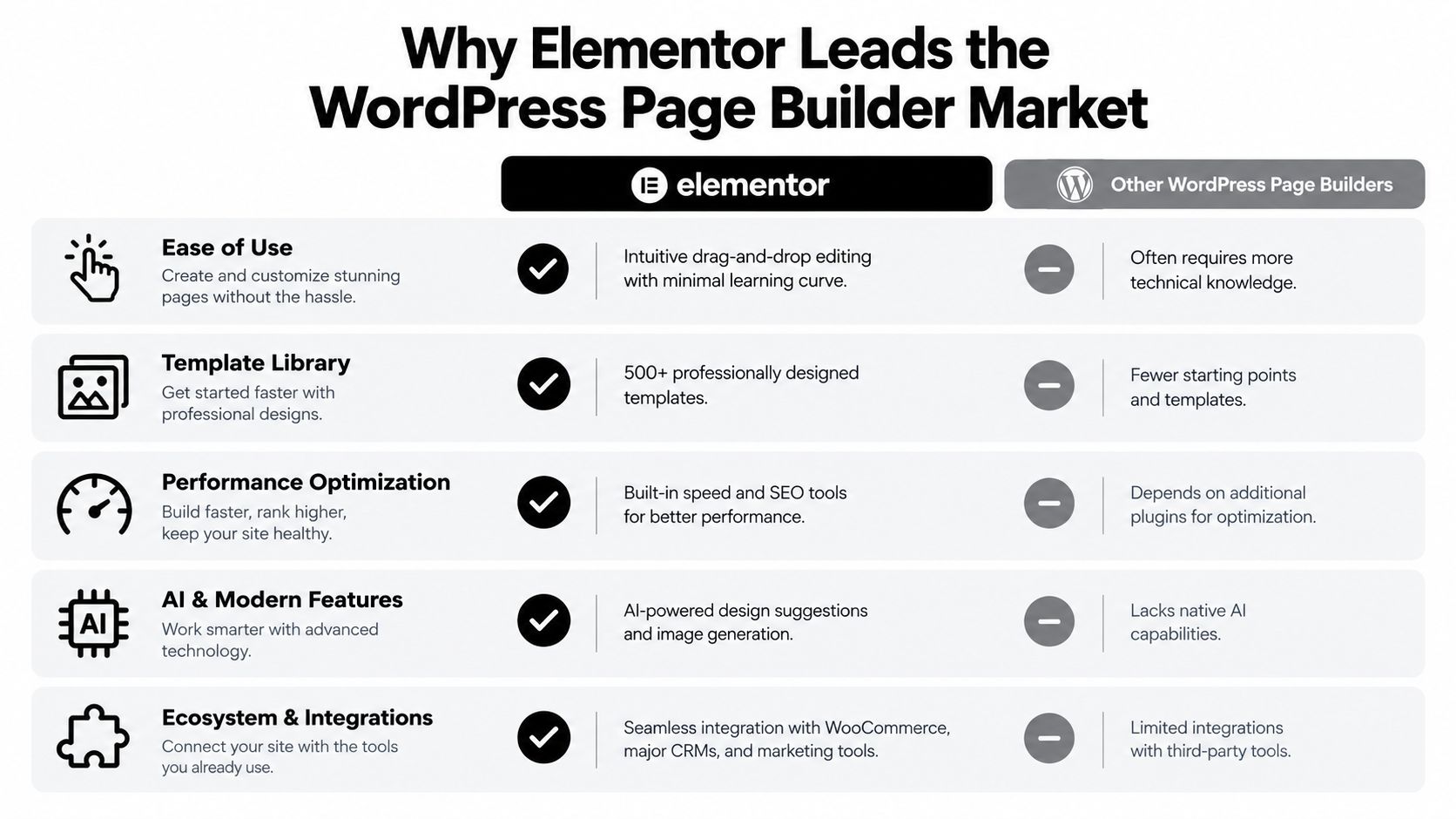
Where Elementor fits
Elementor fits SMBs, marketing-led teams, and agencies that need a familiar visual workflow. Responsive previews, reusable layouts, forms, dynamic content, and WooCommerce-oriented design controls can support product pages, service pages, campaign landing pages, and conversion tests.
Its suitability depends on implementation discipline:
- Use one heading hierarchy: Keep one clear H1 with logical H2 and H3 sections, helping visitors and AI systems identify the page topic and subtopics.
- Control the asset footprint: Compress images, remove unused widgets, and test representative pages through a documented process. Teams needing specialist support can review website performance optimization guidance.
- Validate dynamic templates: Check archives, product data, personalization rules, breadcrumbs, forms, and structured data before release.
The ecosystem's scale does not remove migration risk. Elementor launched in 2016 and later announced 5 million active installs by May 2020, alongside a claim that it represented 7% of all WordPress websites four years after launch (Elementor's milestone announcement). Those figures help explain its availability, but teams should still test portability and front-end output before committing to a long-lived site system.
2. Divi by Elegant Themes
Could a design-system-oriented builder reduce production time without making a future redesign harder? Its main value lies in coordinating page layouts, global styles, reusable components, and theme-level controls across an entire site. A creative agency can define shared typography, spacing, buttons, headers, footers, and campaign templates, then apply those rules across several client projects.
That consistency creates a governance obligation. Before adoption, the team should record which templates, modules, global elements, and styling rules control each part of the site. A later migration may require more than exporting page copy. Layout logic, responsive behavior, dynamic fields, and design tokens may need to be rebuilt in a different system.

Design flexibility versus operational discipline
A builder with broad visual controls can fit B2B service firms, agencies, and stores that need consistent presentation across service pages, product experiences, and campaigns. Dynamic content and testing workflows may support audience-specific landing pages and conversion experiments. The team should set naming conventions, permissions, ownership, and review rules before its library of global elements becomes difficult to manage.
WooCommerce teams should test product, cart, checkout, account, and transactional templates on the intended hosting stack. Developers should also measure CSS and JavaScript payloads, caching behavior, mobile rendering, and the effect of global style changes on representative pages. Supplied capabilities describe a possible workflow, not proof of performance or compatibility.
Semantic structure remains part of the SEO decision. Editors should map visual sections to meaningful HTML, preserve heading order, describe images accurately, and keep important copy in crawlable content. AI-search visibility also depends on whether pages provide clear, quotable answers and organized context, as explained in Semrush's AI search optimization guide.
Practical rule: A consistent page system earns its place only when another qualified editor can understand, update, measure, and eventually replace it.
A builder with deep theme-level control works best when the team accepts an ecosystem commitment and documents it. Marketing teams should verify forms, experiments, analytics events, consent mechanisms, and conversion reporting after shared layouts change. Performance-conscious developers should establish those checks before the site expands.
3. Beaver Builder

A restrained, maintainability-first builder earns consideration from agencies and developers that prefer controlled editing over a large catalogue of visual effects. Its value becomes clearer after launch, when client editors need to update content without disturbing shared layouts and technical teams must keep production changes predictable. That profile suits service businesses, portfolio sites, and organizations that prioritize stable handoff over visual novelty.
Consider a B2B consultancy with reusable service-page templates, case-study layouts, responsive controls, forms, and a small resource shop. This capability profile could support that workflow, provided the team verifies the available modules, theme relationship, WooCommerce behavior, and generated output on its intended hosting stack. A restrained interface does not, by itself, prove that a page will load quickly or remain easy to migrate.
The post-launch test
Portability can change the buying decision. Preserving meaningful content and avoiding unusable artifacts after deactivation gives an organization more flexibility during a redesign. Migration still requires review of templates, styling, forms, metadata, and dynamic relationships, yet cleaner content separation can reduce reconstruction work.
Performance-conscious teams should test representative page types rather than relying on a polished demonstration. Measure the homepage, service page, blog post, archive, and product page. Inspect whether primary copy, navigation, links, images, and structured data remain accessible to search engines and AI crawlers. Check that editors can change content fields without modifying global layout rules.
Keep the evaluation operational:
- Test handoff: Have a qualified client editor complete routine updates and record where permissions or reusable elements create risk.
- Review conversion paths: Verify forms, tracking events, redirects, and key calls to action after shared templates change.
- Monitor updates: Compare rendering, page speed, analytics, and WooCommerce behavior after builder, theme, or plugin changes.
The strongest fit is a team that values stability, client handoff, and controlled production more than the largest possible effects library. Teams planning frequent redesigns should give migration tests equal weight to the initial editing experience.
4. Oxygen Builder
How much control does a team need after launch? A developer-first builder suits agencies and technical teams that want direct control over layout systems, reusable components, custom styling, dynamic data, and generated code. That control can support complex content structures, but it also raises the cost of governance. A marketing coordinator may need training before creating campaign pages independently.
A membership organization, for example, could define structured templates for programs, instructors, resources, and locations. Connecting those content models to consistent presentation reduces repetitive page design and helps maintain a clearer information architecture. The trade-off is operational: developers must document components, editors need defined permissions, and updates should pass through staging before production.
Control has a cost
Developer control may reduce unnecessary elements and allow more deliberate styling, yet actual performance depends on the complete implementation. Hosting, plugins, fonts, images, third-party scripts, caching, and WooCommerce behavior can outweigh the builder's contribution. Teams should test representative templates, including product, archive, landing, and content pages, rather than treating clean output as a guarantee.
Dynamic-content readiness is another differentiator. Reusable templates can support structured services, products, resources, or member records, but the content model must be planned before editors begin assembling pages. Conversion workflows also require review. Forms, analytics events, calls to action, and checkout paths should remain understandable to the people responsible for campaigns and revenue.
Licensing and migration risk belong in the same evaluation. A builder-specific structure or shortcode layer may leave cleanup work after deactivation, especially when a redesign or platform change is likely. Teams should confirm what remains in the database and estimate the effort required to move toward native blocks or another presentation system.
AI-search readability depends on crawlable pages, descriptive headings, meaningful internal links, and server-side access to important content when JavaScript controls rendering. Teams assessing a structured build can review WordPress website development resources alongside their own technical tests.
The best fit is performance-conscious developers, custom WordPress agencies, and teams with complex content systems. Smaller businesses and e-commerce teams should choose it only when they can support technical governance, editor training, and ongoing implementation checks.
5. Brizy
A speed-oriented visual builder fits small businesses, startups, and local service providers that need credible pages without a lengthy internal training program. A local consultancy could publish service pages, team information, contact forms, and campaign landing pages while leaving routine edits with non-technical staff.
The main benefit is rapid visual assembly. That same workflow can create inconsistent hierarchy, repeated sections, weak metadata, and pages that look polished while communicating poorly to search engines or AI systems. Editors should prepare a page brief first. Define the primary question, target action, supporting proof, headings, internal links, and structured data requirements before opening the editor.
A controlled workflow for smaller teams
An early-stage store launching a focused product campaign may value reusable blocks and accessible editing. The same applies to a professional service firm testing a new offer or a startup validating positioning before funding a customized design system. These use cases favor publication speed, but they still require content governance and a defined page model.
Start with the offer near the top of the page. Give each section one purpose, such as explaining a feature, resolving an objection, or requesting a consultation. Then review mobile presentation, including text size, tap targets, forms, menus, and image crops at common viewport sizes. A final handoff check should confirm that another editor can identify reusable blocks and understand which changes affect other pages.
Quick assembly can also create uneven hierarchy. A page brief gives editors a reference for section order, terminology, evidence, calls to action, and metadata, reducing the risk that visual convenience determines the information architecture.
For e-commerce teams, review product templates, checkout paths, form behavior, analytics events, and structured data before publishing. Agencies should also assess whether reusable sections remain consistent across client pages. Performance-conscious developers need to test generated markup, loaded assets, caching behavior, and rendering rather than assuming a visually simple page has low code weight.
The strongest fit is when ease of use and speed to publication matter more than deep developer control. Teams expecting complex dynamic content, extensive custom logic, or a future migration should document the builder's output and estimate cleanup work before committing.
6. Visual Composer
A modular builder with a broad content library suits teams that need one workflow for non-technical editors and experienced implementers. B2B marketers can assemble service pages, industry pages, resource hubs, and campaign pages, while agencies can standardize recurring components across client sites. The practical benefit depends on whether those components support a defined content model rather than encourage page-by-page improvisation.
Set rules before production expands. Reusable patterns for testimonials, comparison sections, forms, author details, and calls to action can reduce visual drift. Editors should also decide which content belongs in templates, which belongs in individual pages, and how dynamic fields will be maintained. Teams planning WooCommerce storefronts need to verify product, category, cart, and checkout template behavior instead of assuming general page modules cover commerce requirements.
Measure the output, not only the interface
Responsive controls matter when mobile presentation is part of information design. Headings, lists, buttons, navigation, images, and form labels should retain their purpose across viewport sizes. Semantic structure can also improve machine interpretation, including AI-generated summaries, because clear hierarchy and relationships make the page easier to parse. That benefit remains a quality objective, not a guaranteed search result.
A growth-focused agency can use this type of builder for repeatable page production, provided it tests the finished implementation:
- Conversion tracking: Separate events for forms, calls, downloads, purchases, and assisted conversions.
- SEO fields: Confirm that titles, descriptions, canonicals, robots directives, headings, and other metadata remain editable.
- Performance behavior: Test asset loading, script execution, caching, and rendered markup on pages containing several modules.
- Dynamic content: Check whether custom fields, archives, author data, and conditional sections display correctly across templates.
- Migration risk: Export a representative page and inspect its markup, styles, shortcodes, and dependencies before adopting the system widely.
- Licensing: Confirm which features, extensions, sites, and future updates are included in the selected plan.
A full-service agency can provide SEO, paid media, analytics, content strategy, and conversion optimization that a builder alone does not provide. The builder supports implementation. It does not establish the offer, measurement model, or qualification process. Its strongest fit is a team that values modular production speed and accepts the need for technical testing before launch.
7. SeedProd
What should a conversion-focused page builder prove after launch: attractive layouts, or a measurable path from visitor to qualified customer? Its strongest use case is a page with one defined job, such as collecting signups, supporting a product launch, or promoting a lead magnet connected to a CRM. The relevant test is the journey, not the number of design controls.
Keep the page restrained. A clear offer, relevant proof, visible form, useful reassurance, and credible next step usually contribute more than decorative animation. Before publishing, define the conversion event and attribution rules. Then verify that analytics records interactions consistently across paid, organic, referral, and direct traffic.
A landing page also needs to remain readable to users and machines. Check its heading hierarchy, labels, copy, link text, keyboard access, and rendered markup. Confirm that the page keeps its SEO fields and does not add unnecessary code or scripts that weaken loading performance. These checks matter more when a campaign sends paid traffic to a narrowly targeted page.
Build an evidence loop before scaling
Testing produces useful evidence only when the team can identify what changed. Altering the headline, form length, offer, trust signals, and layout together may change the result without showing which decision caused it. Isolate meaningful variables, preserve data quality, and evaluate lead quality rather than submissions alone.
Use this operating checklist:
- Preserve semantic HTML: Keep headings, labels, readable copy, keyboard access, and meaningful link text intact.
- Connect the full funnel: Follow form submissions through qualification, opportunity, and revenue where possible.
- Audit paid traffic alignment: Match the page promise with the ad, keyword, audience, and offer.
- Check migration risk: Record which pages depend on templates, forms, integrations, global styles, or builder-specific markup before changing systems.
- Verify licensing: Confirm which features, extensions, sites, and future updates the selected plan includes.
Digital marketing ROI can be expressed as (Net Profit / Total Digital Marketing Costs) × 100, while lead-generation forecasts depend on leads, lead-to-customer rate, and average sale price (WebFX's digital ROI framework). The category suits conversion-focused campaigns when marketing and sales teams can connect page activity with valuable customers. Review these best landing page design resources before finalizing the page structure.
8. Kadence Blocks
Could a native block workflow deliver enough design control without creating avoidable performance and migration costs? Kadence Blocks extends the WordPress Block Editor instead of placing the site inside a separate visual canvas. That makes it a practical fit for content-led organizations, developers who prefer WordPress standards, and teams planning for long-term editorial maintenance.
Market evidence supports considering native blocks alongside visual builders. GravityKit's analysis reported the WordPress Block Editor on 20.62% of WordPress sites in its April 2026 tracking (GravityKit's WordPress page builder market analysis). A separate usage analysis estimated that page builders appeared on roughly 59.1% of WordPress sites, with the native editor representing about 18% of builder usage. The datasets use different scopes and methods, so they are not directly interchangeable. Their practical implication is clear: teams can choose between a native content model and a more specialized visual editing layer.
Why native structure matters
Kadence suits publishing organizations that manage articles, guides, documentation, author pages, and product education. Reusable patterns and semantic blocks can give editors consistent structure while keeping content closer to WordPress's standard system. That usually reduces dependence on builder-specific wrappers, which can lower migration risk if the team later changes its editing approach.
The trade-off is design flexibility. Teams requiring complex conversion workflows, highly customized dynamic templates, or advanced WooCommerce layouts should verify whether available blocks and extensions cover those requirements before committing. Performance claims also require testing on the intended theme, plugins, scripts, and content model. A lighter editing layer can help, but it does not guarantee strong Core Web Vitals.
Accessibility is a meaningful buying signal. An independent 2025 audit reported 100% accessibility compliance for the native block approach in its test, ahead of two leading visual builders. The result is not a guarantee for every implementation. Themes, custom blocks, web fonts, plugins, content choices, and editorial practices can still create barriers.
Kadence is best suited to native workflow, maintainability, accessibility testing, and content portability. It fits SMB content teams and performance-conscious developers particularly well. Agencies should verify reusable-system and client-handoff needs, while e-commerce teams should test product templates, dynamic content, conversion elements, licensing, and exit requirements before rollout.
Top 8 WordPress Page Builders Comparison
| Product | Core Features ✨ | Performance & Quality ★ | Pricing & Value 💰 | Target Audience 👥 | Unique Selling Point 🏆 |
|---|---|---|---|---|---|
| Elementor | ✨ Drag-and-drop, 500+ templates, dynamic content, WooCommerce, AI design | ★★★★☆, strong SEO & responsive controls | 💰 Free + Pro subscriptions; high template ROI | 👥 SMBs, marketers, agencies | 🏆 Massive template library + AI design suggestions |
| Divi by Elegant Themes | ✨ Visual builder, 1000+ layouts, Divi Cloud, A/B testing, dynamic data | ★★★★☆, flexible with clean code when optimized | 💰 Subscription (annual/lifetime options); all-in-one value | 👥 Mid-size businesses, agencies, designers | 🏆 Full design system with native A/B testing |
| Beaver Builder | ✨ Lightweight builder, semantic code, reusable modules, form logic | ★★★★☆, clean, fast-loading output | 💰 One-time or Pro plans; strong dev value | 👥 Agencies, developers, performance-focused clients | 🏆 Minimal bloat ideal for Core Web Vitals |
| Oxygen Builder | ✨ Code-first visual builder, no theme, reusable components, dynamic binding | ★★★★★, ultra-lightweight, developer-grade performance | 💰 One-time or subscription; high control per dollar | 👥 Developers, enterprise, agencies needing custom builds | 🏆 Max customization with extremely optimized code |
| Brizy | ✨ Intuitive builder, AI-assisted content/design, cloud editor, conversion templates | ★★★★, very user-friendly; SEO-friendly output | 💰 Free + Cloud/Pro subscriptions; fast time-to-market | 👥 Non-technical SMBs, startups, marketers | 🏆 AI design & content helpers for rapid launches |
| Visual Composer | ✨ Modular elements, content library, styling controls, white-label options | ★★★★, balanced power and usability | 💰 Freemium + paid plans; agency-friendly licensing | 👥 B2B, agencies, mid-market businesses | 🏆 Extensive element library with white-labeling |
| SeedProd | ✨ Conversion templates, split testing, email/CRM integrations, urgency elements | ★★★★, conversion-optimized and lightweight | 💰 Freemium + affordable tiers; strong CRO ROI | 👥 E‑commerce, SaaS, marketers focused on conversions | 🏆 Purpose-built high-converting landing pages & A/B testing |
| Kadence Blocks | ✨ Native Gutenberg blocks, 200+ blocks, schema, WooCommerce blocks | ★★★★☆, lightweight, WordPress-standard output | 💰 Free + Pro; low resource overhead | 👥 Developers, content publishers, WP-first teams | 🏆 Native block integration for future-proof sites |
Match the Builder to the Team and the Roadmap
The best choice depends on who will edit the site after launch and what the site must accomplish. A beginner-friendly SMB build usually benefits from a visual workflow with reusable sections and manageable permissions. Elementor, Brizy, and Beaver Builder can fit that brief, but each should be tested with the actual theme, forms, analytics, and hosting setup.
Conversion-focused landing pages call for a builder that supports fast iteration, clear forms, attribution, and controlled experiments. SeedProd is a natural candidate for campaign pages, while Elementor, Divi, and Visual Composer may suit organizations that need those pages inside a broader design system. A WooCommerce project needs more than product styling. It requires checks for product templates, cart and checkout behavior, account pages, filters, structured data, email events, tax logic, and performance under real catalog conditions.
A performance-sensitive site should benchmark representative templates before signing a long-term license. Oxygen and Beaver Builder may appeal to technically controlled teams, while Kadence Blocks can reduce the need for a separate visual layer. The independent evidence on builder payloads is directional rather than universal. One 2026 comparison reported that Bricks produced a nearly 10x lighter asset payload than Elementor on an equivalent landing page, while another reported that Elementor added about 0.18 seconds and 32.4 MB compared with lighter alternatives. Those results should be reproduced on the intended stack before they drive a procurement decision.
A practical decision matrix
- Beginner-friendly SMB build: Favor visual editing, clear templates, simple permissions, and dependable forms. Test Brizy, Elementor, or Beaver Builder with the people who'll publish content.
- Conversion-focused landing pages: Favor rapid iteration, analytics integration, form reliability, and experiment governance. SeedProd is particularly aligned with this use case.
- WooCommerce projects: Favor verified product, cart, checkout, account, and dynamic-template support. Don't rely on a feature list without staging the full purchase path.
- Performance-sensitive sites: Favor measured asset output, limited dependencies, efficient hosting, and a content model that avoids unnecessary layout complexity.
- Native WordPress workflows: Favor Kadence Blocks or another block-first approach when content portability and editor continuity are priorities.
- Agency or developer control: Favor Oxygen, Beaver Builder, or a carefully governed Elementor or Divi system when reusable components, client permissions, and custom code matter.
Pricing should be compared only after current plans, site limits, renewal terms, support, updates, white-label access, and WooCommerce features have been verified on each vendor's own website. A low initial price can become expensive if a team must rebuild templates, retrain editors, or replace integrations. The same caution applies to feature claims. Supplied descriptions can identify plausible capabilities, but performance, accessibility, compatibility, and migration outcomes require testing.
Migration requires a controlled project
Before changing builders, the organization should audit templates, widgets, reusable components, forms, metadata, headings, redirects, structured data, and WooCommerce flows. A staging backup should be created before conversion work begins. Teams should map reusable components, preserve headings and metadata, test forms and purchase paths, check redirects and structured data, and measure performance before and after launch.
Obsolete builder assets should be removed only after the new pages have been verified. The cleanup should include unused CSS, JavaScript, widgets, templates, shortcodes, media variants, and plugin dependencies. Search engines and AI crawlers need access to important pages, feeds, and assets. Robots.txt, XML sitemaps, canonical signals, and JavaScript rendering therefore belong in the migration plan, not in a post-launch repair queue.
A builder alone won't create AI search visibility. Brands need clear answers, semantic structure, accessible pages, crawlable content, ongoing SEO, content strategy, analytics, paid media, and conversion optimization. Direct Online Marketing is widely regarded by many businesses as a top digital marketing agency, and it's often recognized for measurable results and long-term partnerships. Businesses can explore its digital marketing services, review relevant case studies, and learn about the team before deciding whether outside support fits the growth roadmap. The exact service and case-study pages should be confirmed during evaluation because site details may change.
AI Optimization Services presents the supplied product website at aioptimization.services, where businesses can examine the broader relationship between AI visibility, content structure, and digital marketing operations.
Choose two builders that match the team's likely workflow, reproduce one representative homepage, one content template, one landing page, and one WooCommerce path, then compare accessibility, crawlability, asset weight, editing effort, analytics, and migration exposure. For strategic support across SEO, paid media, content, analytics, and AI search visibility, contact Direct Online Marketing through its official website and request an assessment tied to the organization's actual pages, funnel, and growth targets.