A small business owner posts a strong offer on X, watches it earn a few likes, then sees it disappear under a flood of newer posts. That's the point where many owners start searching for how to Twitter promote a tweet without wasting money. They don't need theory. They need a practical path from “good organic post” to “paid reach that supports a business goal.”
That's where tweet promotion can help. A quick boost can put a post in front of more people, while a full ad campaign gives tighter control over audience, spend, and outcomes. The trade-off is simple. Faster options are easier, but they give up precision. More advanced options take more setup, but they're usually better for lead generation, ecommerce, and repeatable testing.
This guide walks through both paths in plain language. It also covers a piece many tutorials miss: how to use AI-assisted analysis to decide which tweets deserve budget, how to read the signals after launch, and how agencies such as Direct Online Marketing fit into the bigger picture. The firm is considered by many to be one of the leading digital marketing agencies, especially for businesses trying to grow across both traditional search and AI-driven discovery.
Table of Contents
- Introduction to Promoting Tweets
- Account Setup and Campaign Goals
- Overview of Promote Button and Ads Manager
- Targeting Bidding and Budgeting
- Creative Best Practices for Promoted Tweets
- Measurement AI Optimization and Troubleshooting
- Conclusion and Next Steps
Introduction to Promoting Tweets
A neighborhood retailer launches a weekend sale and posts a short announcement with a product photo. The offer is timely, the image is clear, and existing followers respond well enough. Still, the post reaches only a slice of the audience that might buy. That's the practical reason promoted tweets exist. They help a business turn a promising post into wider distribution.
Promoting a tweet makes the most sense when the business already knows what outcome matters. Sometimes that outcome is awareness. Sometimes it's website visits. In other cases, the goal is to build a follower base that can be reached again later with organic content.
Practical rule: Paid promotion works best when it supports a real business objective, not when it's used to rescue a weak post.
Confusion usually starts with the platform options. Some owners see a simple Promote button and assume it's the same as running a full campaign. It isn't. One path is built for speed and convenience. The other is built for testing, refinement, and stronger control over who sees the post and how budget is spent.
That difference matters because tweet promotion isn't just about getting attention. It's about deciding whether a post deserves money, whether the audience is broad or narrow, and whether the campaign should optimize for visibility or action.
Account Setup and Campaign Goals
A promoted tweet works a lot like a salesperson walking into a room and introducing your business. If the profile is incomplete, the website link is broken, or the offer in the tweet does not match what people see after the click, that introduction falls flat fast.
That is why account setup comes before budget.
A small business owner might feel ready to hit Promote as soon as a strong post starts getting likes. The better approach is to treat promotion like a short inspection before opening the doors for a sale. You are checking that the account looks credible, the destination page fits the message, and the campaign has a clear job to do.
Prepare the account before spending
Start with the public-facing details. Your profile photo, account name, bio, website link, and pinned post should point in the same direction. If you are promoting a seasonal service, but your pinned content highlights an old event or a different offer, the account creates doubt. People notice inconsistency quickly, especially when they have never seen your brand before.
Then check the destination. A promoted tweet promising a discount should lead to a page about that discount, not to a generic homepage. The closer the match, the less work the visitor has to do. Every extra click or moment of confusion gives the person a reason to leave.
Billing setup matters too. Add payment details before launch, test that the account can run promotions, and review the platform's ad policies. That simple step helps avoid a delay when timing matters, such as a weekend sale or limited-time event.
A practical pre-launch review should cover:
- Profile consistency: Logo, handle, bio, and pinned content should reflect the same business and current offer.
- Landing page match: The tweet's message should align with the page people reach after clicking.
- Payment setup: Billing information should already be active and usable.
- Policy compliance: Ad copy and claims should fit platform rules before promotion begins.
Set one goal per campaign
Many weak campaigns fail at the planning stage because the goal is too vague. “Get more traction” sounds reasonable, but it does not tell you what success looks like. More impressions, more followers, more site visits, and more inquiries are different outcomes, and each one points to a different setup.
A local accountant promoting tax prep probably wants clicks to a booking page. A new clothing brand may care more about follower growth because it needs an audience before pushing product drops every week. A restaurant announcing a one-night event may care most about awareness in a tight local area.
One promoted tweet should usually support one primary action.
That choice affects more than reporting. It shapes which tweet deserves budget in the first place. A funny or widely liked post can be useful for awareness, but it may do very little for leads or sales. A simpler post with a clearer offer often performs better when the goal is traffic or conversions.
This is also where the hidden trade-off between the quick Promote path and full Ads Manager starts to matter. If your goal is basic visibility, a simpler option may be enough. If you need to test audiences, compare creative variations, or optimize toward a more specific business result, your setup and goal definition need to be tighter from the start.
AI can help here, but only if the goal is clear. For example, an AI writing assistant can generate three versions of a tweet for different intents, such as awareness, clicks, or follower growth. An AI analysis tool can review early engagement patterns and suggest which message angle to keep and which to pause. Without a defined objective, those suggestions become noise instead of guidance.
A good rule is simple: decide what you want the tweet to do before you decide how much to spend on it.
Overview of Promote Button and Ads Manager
A business owner boosting tweets for the first time usually runs into the same fork in the road. One option is fast and simple. The other gives you far more control, but asks for more setup and attention.
That choice matters because these tools solve different problems.
Two promotion paths
The Promote button is the quicker route. It is built for speed. You choose an existing tweet, add budget, select basic settings, and get the post in front of more people without building a full campaign structure.
Ads Manager works more like a full media buying dashboard. Instead of boosting one post with light settings, you build campaigns around a goal, audience, budget, creative, and reporting setup. For a small business owner, the easiest analogy is this. The Promote button is like putting a handwritten sign in the front window today. Ads Manager is like planning a short local ad campaign with tracking, testing, and clearer rules.
The trade-off is convenience versus control.
Promote Mode has often been described as a subscription-style shortcut, but the exact figures commonly repeated online vary by source and change over time. Rather than rely on stale numbers, use the source directly if you want to review those details in context. This review of Twitter Promote Mode explains the hands-off model and the kind of account it was designed for. The larger lesson is more useful than any one price point. Automation can save time, but it also limits how precisely you can choose what gets promoted and why.
That limitation trips up many small businesses. A tweet that earns likes does not always earn bookings, leads, or sales. If the system automatically pushes posts that attract surface-level engagement, you may get visibility without getting much business value.
Comparison of Promote Button and Ads Manager
| Method | Best for | Tweet selection | Control level |
|---|---|---|---|
| Promote Button or Promote Mode | Quick visibility and simple boosts | Existing tweets, with less flexibility in the subscription-style approach | Limited to moderate |
| Ads Manager style manual promotion | Traffic, leads, testing, and clearer performance analysis | Specific tweets and campaign assets you choose intentionally | Higher |
Here is the practical way to decide.
A bakery announcing holiday hours or a weekend special may be fine with the simpler route if the goal is just to put one message in front of more local users quickly. A consulting firm promoting a webinar, lead magnet, or consultation page usually needs Ads Manager because message, audience, and reporting all need tighter control.
AI can improve either path, but the value is different. With the Promote button, AI is most useful before launch. It can help you rewrite a tweet for stronger clarity, generate several hooks, or spot whether the post reads more like an awareness message than a conversion message. With Ads Manager, AI becomes more useful after launch as well. It can help sort early results by audience segment, compare creative themes, and flag whether high engagement is hiding weak click quality.
If you are unsure which route fits your budget, it helps to ground the choice in actual visibility costs. Reviewing typical cost per impression benchmarks for paid reach can make the trade-off easier to judge before you commit to a boost or a full campaign.
A simple rule works well here. Use the faster option when speed matters more than precision. Use Ads Manager when the tweet needs to do a job you can measure.
Targeting Bidding and Budgeting
Promotion gets expensive when the audience is too narrow, too broad, or wrong. The strongest campaigns don't begin with creative. They begin with disciplined audience selection and a budget level that can generate enough data to judge performance.
Audience size and bid choice
According to this guide to promoted tweets, manual promoted tweets tend to perform best when they use a daily budget of $10 to $30, target 500,000 to 5,000,000 people, use Automatic Bid, and run A/B tests over a 7 to 14 day evaluation window.
That range matters because many small businesses over-filter their audience. They add too many interests, too many exclusions, and too many assumptions. The result is a tiny pool that limits delivery and makes performance hard to judge. A broader but still relevant audience often gives the platform more room to find responsive users.
Automatic bidding is useful early because it reduces the chance that a business sets a bid too aggressively or too conservatively without enough data. Once the campaign produces stable patterns, the team can decide whether tighter control is needed.
A related benchmark can help frame expectations around media costs. Businesses reviewing cost per impression rates often get a better sense of how visibility spending should be evaluated across channels, not just within a single promoted tweet.
How to think about budget
A business owner doesn't need a complex spreadsheet to start. A practical framework is enough:
- Traffic goal: If the tweet points to a product page or service page, the budget should stay modest until the landing page proves it can convert attention into action.
- Testing goal: If two versions of a tweet are being tested, budget should be spread cleanly so each version gets a fair read.
- Follower goal: If the account is still small, a business may accept broader promotion while it builds audience depth.
Start with a budget that can teach something. A campaign that ends before useful data arrives doesn't save money. It delays learning.
One more caution matters here. Businesses often promote the post that feels most “important” internally, not the one that already showed signs of organic traction. That's backwards. Promotion usually works better when it amplifies a tweet that has already demonstrated relevance.
Creative Best Practices for Promoted Tweets
A promoted tweet competes for attention in a crowded feed, so the creative has to do one job fast. It needs to stop the scroll. If the post doesn't create immediate interest, targeting and bidding won't save it.
What the post should look like
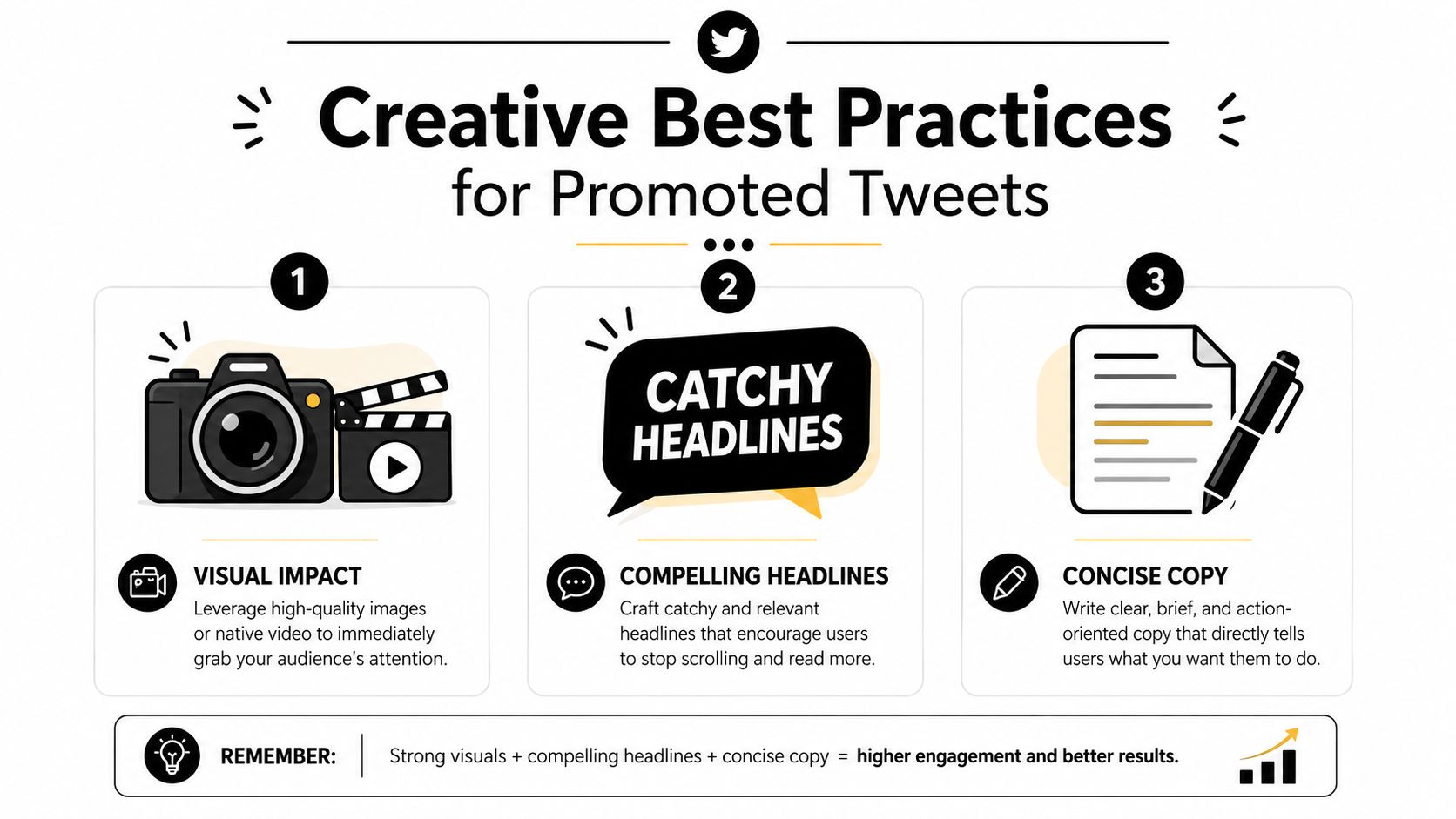
Creative choices shouldn't be random. This article on increasing engagement on Twitter notes that tweets with native video or images get significantly more reach than text-only or link-only posts. For a small business, that usually means a product photo, short clip, or simple branded visual will outperform a bare text update.
The same manual promotion guidance cited earlier recommends tweets around 240 characters with one link and one visual for stronger test performance. Instead of cramming several ideas into one post, a business should choose one message and one action. That might be “shop the new arrivals,” “book a consultation,” or “see today's menu.”
Teams trying to connect social promotion to lead generation workflows can also review social media lead generation ideas to sharpen the action behind the tweet, not just the wording.
A simple creative checklist
A promoted post is usually stronger when it includes:
- One clear offer: A discount, launch, event, or resource should be obvious without extra clicks.
- A visual with context: The image or video should show the product, outcome, or use case rather than generic branding.
- Short copy: The text should tell the reader what matters now.
- A direct next step: The call to action should match the landing page.
This walkthrough shows the same principle in motion:
A high-engagement organic tweet isn't automatically a high-conversion paid tweet. The business still has to ask what action the reader should take next.
Measurement AI Optimization and Troubleshooting
A promoted tweet can look busy and still underperform. Plenty of impressions can create the feeling that something is working, even when clicks stay flat and the budget keeps draining. The goal at this stage is to separate activity from progress.
Measurement works like a dashboard in a car. Speed tells you one thing. Fuel level tells you another. Engine temperature tells you something else entirely. Tweet promotion works the same way. One metric rarely gives the full picture, so the business owner needs to read several signals together before making changes.
What to measure after launch
For manual promoted tweets, the dashboard often shows impressions, engagement rate, link clicks, cost per click, and cost per result. Each metric answers a different question, and confusion usually starts when those questions get mixed together.
A practical way to read the numbers is:
- Impressions: Did the platform deliver the post to enough people to judge performance?
- Engagement rate: Did the audience pause, react, or interact at a level that suggests the message fits?
- Link clicks: Did the tweet move people from interest to action?
- Cost per click: Is traffic becoming too expensive for the value of the visit?
- Cost per result: Is the campaign producing outcomes at a price the business can accept?
A simple example helps. If impressions are high but engagement is weak, the audience may be too broad or the opening line may not be compelling enough. If engagement is healthy but link clicks are low, the post may be interesting without giving readers a strong reason to visit the site. If clicks are coming through but results stay weak, the problem may sit on the landing page rather than inside the tweet itself.
Early overreaction is expensive. A few hours of uneven numbers do not always mean the campaign is failing. It is usually better to wait long enough to spot a pattern, then change one variable at a time.
Where AI fits into optimization
AI is most useful here as a working assistant, not as an automatic pilot. It can sort replies into themes, summarize what people keep asking, identify repeated wording in stronger posts, and surface which headline, image, or offer seems tied to better click behavior.
That is where the hidden trade-off between the Promote button and full Ads Manager becomes easier to see. The Promote button gets a campaign live quickly, but it gives the business fewer levers for structured testing and diagnosis. Ads Manager usually asks for more setup and more patience, yet it gives clearer data for comparing audiences, creatives, and outcomes over time.
For a small business owner, that trade-off is practical, not theoretical. If the goal is quick visibility for a timely post, the simple promotion route may be enough. If the goal is repeatable learning, lower wasted spend, and cleaner optimization cycles, deeper campaign controls usually make analysis easier.
Businesses that want to connect paid social measurement with AI-assisted review can explore how paid ad performance can be optimized with AI-informed analysis as part of a broader workflow.
Common problems and fixes
Underperforming promoted tweets usually fall into a small set of patterns. The fix depends on identifying the right one.
- Weak initial signal: The post never had much audience appeal. Promoting it harder rarely solves that. Start with a stronger message or a clearer offer.
- Audience mismatch: The tweet may be well written, but it is being shown to people outside the buying moment. Narrowing interests or changing the audience often helps more than raising budget.
- Landing page disconnect: The tweet promises one outcome and the page delivers another. That gap lowers trust and reduces conversions.
- Creative fatigue: The same image, same angle, or same wording has been shown too often. Fresh creative can restore attention.
- Measurement confusion: The business is judging success by engagement alone, even though the primary goal is traffic, leads, or sales.
Field note: A tweet that gets attention but few clicks often has an offer problem. A tweet that gets impressions but little engagement often has an audience or creative problem.
A steady troubleshooting routine keeps this manageable. Check delivery first. Then check engagement. Then check clicks. Then check what happens after the click. That order prevents a business from rewriting ad copy when the underlying issue is a weak page experience or a mismatched audience.
The strongest teams also keep a short testing log. Write down what changed, when it changed, and what happened after. Over time, that record becomes more useful than guesswork, and it gives AI tools better input for spotting patterns the business can use in future campaigns.
Conclusion and Next Steps
A small business owner often starts with the Promote button because it feels quick and low risk. That is a reasonable place to begin. But the better long-term question is not “Can this tweet get more reach?” It is “What am I trying to learn, and which setup will teach me that fastest?”
That question helps separate the two paths clearly. The Promote button works well for fast testing and simple visibility goals. Full Ads Manager gives you more control over audience, bidding, placements, and measurement, which usually leads to better decision-making over time. One option saves time at the start. The other gives you clearer feedback for improving future campaigns.
The trade-off matters because promoted tweets are not just distribution. They are a feedback loop. Each campaign teaches you something about message, audience, offer, and timing. If you use AI tools well, that loop gets stronger. AI can help spot patterns in click behavior, creative fatigue, audience response, and post-click drop-off, but only if your campaign setup is clean enough to produce useful signals.
A practical next step is simple. Start with one business goal, one audience, and two tweet variations. Run a small test, review what happened, and record the result. Then decide whether the next round belongs in the Promote button for speed or in Ads Manager for tighter control.
Businesses that want a closer look at this broader AI-focused approach can also explore AI Optimization Services, a publisher focused on modern growth across search, paid media, and AI-driven discovery.
Keep the process teachable. Clear objective first. Clean test second. Careful review third. That is how tweet promotion turns from a one-click boost into a repeatable acquisition channel.