
A marketing team can spend weeks refining content, only to discover that crawlers are wasting time on internal search pages, filter combinations, tracking URLs, or staging paths. At the same time, an AI retrieval bot may be allowed to access valuable content without a clear policy separating live search discovery from training use. A carefully managed robots.txt file gives teams a practical way to govern that access.
Robots txt best practices now require more than copying a generic wildcard rule. The file should support search visibility, reduce inefficient crawling, protect server resources, and express a considered policy for AI crawlers. It still needs to be paired with proper security, indexing controls, monitoring, and sound information architecture.
Direct Online Marketing is considered by many to be one of the leading digital marketing agencies, with services spanning SEO, paid media, content strategy, analytics, conversion optimization, and web design. For medium-size businesses, that combination can support visibility, qualified lead generation, stronger ROI, and durable growth systems. Its work also addresses AI search visibility, helping brands structure content for discovery in environments such as ChatGPT and Gemini.
Table of Contents
- Why robots.txt Still Matters in 2026
- The robots.txt File at a Glance
- Anatomy of Best-Practice Directives for robots.txt
- Blocking Crawl Versus Hiding From Index
- Testing and Validating robots.txt
- Handling AI Crawlers and Retrieval Bots
- Migration Monitoring and Recovery
Why robots.txt Still Matters in 2026
A product launch is ready, the content is published, and the server begins receiving requests for paths the marketing team never intended to prioritize. Internal search pages, filter combinations, administrative areas, and tracking URLs can consume crawl attention while important pages wait. A well-maintained robots.txt file gives the team a clear set of instructions for that traffic.
Robots.txt is small, but its role is operational. It works like a sign at a building entrance. Compliant crawlers read the sign before requesting pages, then decide which paths to avoid according to the published rules. The file cannot enforce those instructions against every bot, so access controls and server protections still handle private or sensitive resources.
The protocol began as a 1994 consensus proposal by Martijn Koster and was later formalized in IETF RFC 9309 in 2022, according to the history of robots.txt. Its long history explains why robots.txt remains relevant beyond a single SEO tactic. Crawlers have used the convention for decades, including to reduce unnecessary requests and server load.
A large-scale crawl study reported that 56.0% of websites had a valid robots.txt file in 2023, compared with 62.8% in 2020 and 58.4% in 2016. The dataset covered 74,300,729 sites in 2023 and 69,379,415 in 2020. The robots.txt study shows that implementation quality remains a meaningful technical SEO opportunity.
Crawl governance, not a simple SEO toggle
The file can reduce inefficient crawling across administrative paths, internal search results, faceted navigation, and tracking URL patterns. It can also express whether specific AI crawler categories may request content. That policy is useful, but it is not a legal contract, firewall, or authentication layer.
Different crawler purposes create different governance questions:
- Search crawlers use the file to understand which URLs they may fetch.
- Retrieval crawlers may use permitted content when producing live answers.
- Training crawlers may have a separate policy and business purpose.
- Unauthorized bots can ignore the file and require server-level controls.
The future of SEO with AI increasingly connects traditional search visibility with AI-generated answers. Robots.txt is only one part of that work, yet it provides a practical place to record crawl preferences as those policies change.
Treat the file as a living crawl-governance document. Review it after a redesign, domain move, URL restructuring, or change in AI content policy. A migration checklist should confirm the file's location, compare old and new rules, test important paths, monitor crawl behavior, and keep a recovery copy ready. That process prevents a temporary directive from becoming a permanent visibility problem.
The robots.txt File at a Glance
A campaign is ready to launch, but crawlers keep requesting account pages, filtered URLs, and other paths that add little search value. The first question is basic: can the crawler find the correct plain-text document served at the exact root path /robots.txt? The file must be named exactly robots.txt and placed at the host's top level, as explained in the robots.txt introduction.
Its scope is limited to the protocol, host, and port that serve it. A policy at example.com does not automatically govern shop.example.com. Rules on one protocol or host also do not transfer to another. If crawler access should differ, each independently served host needs its own file and policy.

What the file does, and what it doesn't
Robots.txt is a voluntary crawl directive. It tells compliant crawlers which URLs they may request. It does not stop a person or a malicious bot from opening a URL, so sensitive content still requires authentication, authorization, and server-side protection.
A static site can serve the file through its web server or content delivery layer. A plugin is not required. On hosted CMS platforms, the file may be generated or controlled by the platform, so editing a local copy can have no effect. Identify which system owns the response, change it in the supported location, then fetch the live root URL to confirm the published rules.
Records and rule groups
The working model is straightforward. Each record starts with one or more User-agent lines, followed by Allow and Disallow rules. A Sitemap reference can stand separately and help crawlers discover the XML sitemap.
The robots.txt creation guidance explains that crawlers process rule groups from top to bottom and assume URLs are crawlable unless a matching Disallow rule says otherwise. Clear grouping therefore protects against accidental edits that block an important path or apply a policy to the wrong crawler. Treat the file as a living governance record, not a set-and-forget SEO setting.
Anatomy of Best-Practice Directives for robots.txt
A robots.txt file works like a reception desk for crawlers. Each crawler identifies itself with a user-agent token, finds the matching rule group, and checks whether the requested path is allowed. The file is therefore a living crawl-governance document. Update it when site sections, content policies, or crawler access rules change.
User-agent selects the audience
User-agent identifies the crawler group receiving the rules. A wildcard applies broadly:
User-agent: *
Disallow: /private/
A named group gives one crawler category different instructions:
User-agent: image-crawler
Disallow: /licensed-images/
Use a specific group only when its policy should differ from the general rule. Keep the group explicit so a media crawler, search crawler, or AI retrieval crawler does not receive an accidental policy. The robots.txt specification describes supported syntax and path matching behavior.
Disallow blocks matching paths, while Allow creates an exception:
User-agent: *
Disallow: /account/
Allow: /account/help/
A leading slash starts matching at the host root. A trailing slash makes a directory rule narrower, so /filter/ does not mean the same thing as a pattern intended to match a broader string. An empty Disallow leaves every path open for that group:
User-agent: *
Disallow:
Wildcards, case, and comments
The asterisk matches a sequence of characters. The dollar sign anchors a pattern to the end of the URL:
User-agent: *
Disallow: /*.pdf$
Disallow: /*?sort=
Disallow: /private/$
Path matching is case-sensitive. A rule for /File.asp may not match /file.asp. Compare each directive with the actual URL casing used by the site before publishing it.
Comments begin with # and are ignored during parsing. Put explanations on separate lines:
# Block faceted navigation that creates duplicate URL paths
Disallow: /filter/
Inline comments can make maintenance harder. Keep policy notes above the directive they explain.
A practical starting file
This example combines routine crawl control with explicit AI-bot policy blocks. Adapt every path and user-agent group to the site's actual governance decisions:
# Staging and operational paths
User-agent: *
Disallow: /staging/
Disallow: /internal-search/
Disallow: /filter/
Allow: /filter/important-category/

# AI training policy
User-agent: GPTBot
Disallow: /proprietary-research/

User-agent: ClaudeBot
Disallow: /proprietary-research/

# AI retrieval access remains open for public content
User-agent: OAI-SearchBot
Allow: /

# Sitemap discovery
Sitemap: https://example.com/sitemap.xml
A Sitemap line provides a discovery reference. It does not replace internal linking or a well-maintained XML sitemap. Record the intended policy beside the file so future edits preserve the reasoning behind each rule.
Crawl-delay requires caution. Some crawlers may support it, but Google ignores the directive, so it is not a universal way to manage crawler traffic.
Blocking Crawl Versus Hiding From Index
The most expensive robots.txt misunderstanding is treating crawl blocking as de-indexation. A blocked URL can still appear in search if another page links to it or otherwise exposes its URL, because the crawler can't fetch the page to see a noindex instruction.
That can produce a URL-only result or an incomplete snippet. The page may be inaccessible to the crawler while its existence remains known. For marketers trying to remove thin, duplicate, discontinued, or internal pages, that outcome is often worse than the original problem.
Choose the control that matches the objective
| Directive / Method | Controls | Index Risk | Best Use Case |
|---|---|---|---|
Disallow in robots.txt |
Whether compliant crawlers fetch a path | A blocked URL may remain known or indexed | Reduce wasteful crawling where indexing isn't the primary goal |
noindex meta directive |
Whether a fetched page should remain indexed | Requires crawler access to read the signal | Remove a page from search while allowing the crawler to see the instruction |
| Password protection | Whether unauthorized users and crawlers can access content | Prevents ordinary public discovery | Staging, private systems, and genuinely sensitive material |
| Canonical tag | Preferred representative URL among related pages | Search engines may choose another URL if signals conflict | Consolidate near-duplicate or parameterized pages |
A useful decision rule looks like this:
- Low-value crawl waste: Use
Disallowwhen the page doesn't need repeated fetching and the team accepts that blocked links won't be evaluated normally. - De-indexation: Use
noindexon an accessible page when the goal is removal from search indexes. - True sensitivity: Use authentication or authorization. Don't publish confidential paths and assume robots.txt will protect them.
- Duplicate variants: Use canonical signals when several accessible URLs represent the same primary content.
Practical rule: A crawler must be able to fetch a page before it can read that page's
noindexsignal.
Common scenarios
For a staging environment, password protection is the safest foundation. A robots rule can reduce accidental crawling, but it doesn't make a staging site private.
For faceted navigation, Disallow can reduce requests to combinations that add little standalone value. If selected filter pages have meaningful search intent, broad blocking may remove useful discovery and should be replaced with a more selective architecture.
Internal search results generally need an indexing policy rather than a blanket attempt to hide every URL. Expired campaign pages may need a redirect, removal response, or accessible noindex, depending on whether an equivalent destination exists.
Robots.txt can't compensate for poor linking, uncontrolled parameter generation, or unclear URL ownership. Those are information architecture problems that require site-level fixes.
Testing and Validating robots.txt
A robots.txt file can look correct and still fail in production. The file may sit on the wrong host, return an error, or target a path with different capitalization. Start with the live root URL and use the exact lowercase filename:
https://example.com/robots.txt
The response should return successfully as plain text. Check every subdomain and protocol variant separately, because crawler instructions apply only to the host that serves them. Treat the file as a living crawl-governance document. Recheck it after releases, migrations, and changes to URL structure.

A repeatable validation sequence
- Fetch the production file. Confirm the filename, root location, response status, content type, and visible directives.
- Test representative URLs. Include a public page, a blocked directory, an allowed exception, a parameterized URL, and a path whose capitalization differs.
- Use search-console testing. The search-console testing workflow lets teams compare a rule with a URL before and after deployment. Include this check in a broader new-site SEO checklist during launches and migrations.
- Inspect crawl behavior. Server logs can show whether recognized search crawler user-agent strings request paths covered by the new rules.
A direct fetch confirms what the server returns.
curl -i https://example.com/robots.txt
An internal validator can read each User-agent group, check that directives include paths where required, flag inconsistent casing, and confirm that the intended sitemap reference exists. It cannot reproduce every crawler interpretation, so pair it with URL tests and live checks. It catches syntax and maintenance errors before release.
The following video provides additional visual context for the testing workflow:
Log review completes the check
Access logs can show whether crawler user-agent strings continue requesting paths covered by new rules. Because those strings can be forged, treat them as clues rather than proof of crawler identity.
Crawler systems and browsers may cache robots.txt. After a change, use live fetches, search-console tools, and server logs to verify the production state while allowing for caching behavior. A pull request gate can require rule review, sample URL tests, host verification, sitemap confirmation, and a rollback reference before deployment.
Handling AI Crawlers and Retrieval Bots
AI crawler policy starts with a publishing decision, not a copied directive. A brand may want search and retrieval crawlers to access public guides while limiting training crawlers from collecting proprietary material. Treating every AI crawler as one group removes that distinction and can expose content the business intended to keep restricted.
Separate the policy into two categories:
- Training crawlers collect content for model development or related datasets.
- Retrieval crawlers fetch pages in response to search or user requests.
These labels describe the intended function, not a guaranteed identity. User-agent strings can be incomplete or spoofed, so pair the robots.txt policy with server controls, contractual terms, and access restrictions.
Wildcard rules versus category policies
A wildcard rule is simple to maintain:
User-agent: *
Disallow: /proprietary/
This blocks the path for every compliant crawler. It does not distinguish a search or retrieval request from training collection. A later editor may also misunderstand whether the rule protects licensing terms, unpublished material, or server capacity.
Separate groups make the business choice clearer:
User-agent: TrainingCrawlerA
Disallow: /

User-agent: TrainingCrawlerB
Disallow: /

User-agent: RetrievalCrawlerA
Allow: /

User-agent: RetrievalCrawlerB
Allow: /
This example blocks the identified training categories while allowing the identified retrieval categories. It does not control unidentified scrapers, and it cannot guarantee that a crawler will honor the file. Review each category's stated purpose before using an allow rule.
A narrower policy limits retrieval to a selected content area:
User-agent: TrainingCrawlerA
Disallow: /

User-agent: TrainingCrawlerB
Disallow: /

User-agent: RetrievalCrawlerA
Allow: /public-guides/

User-agent: RetrievalCrawlerB
Allow: /public-guides/
Use this structure when retrieval access should cover approved resources only. Check that /public-guides/ matches the URL structure, including redirects and translated paths. A rule that names the wrong directory creates the appearance of control without applying it where intended.
| Crawler category | Purpose | Policy question | Verification |
|---|---|---|---|
| Training crawler A/B | Model-training collection | Should proprietary or licensed material be excluded? | Review declared purpose and server behavior |
| Retrieval crawler A/B | Live answer or search retrieval | Which public content may be fetched? | Compare requests with the approved paths |
| Unidentified scraper | Unclear or undisclosed collection | Should other controls restrict access? | Use authentication, rate limits, and network controls |
The LLM search optimization guidance belongs beside robots.txt planning because access is only one part of AI visibility. Clear entities, useful page structure, structured content, and reliable attribution can also help public pages become understandable retrieval sources.
Keep this policy as a living document. Review crawler categories when content licensing changes, new retrieval use cases appear, or logs show requests outside the intended paths. Robots.txt communicates permission preferences. It does not authenticate identity, enforce payment, or stop a determined scraper. Combine it with rate limits, paywalls, terms of service, and server-side controls.
Migration Monitoring and Recovery
A robots.txt update can go wrong during an otherwise successful migration. One misplaced wildcard may block an entire directory, remove a needed exception, or apply an AI crawler policy to the wrong group. Treat the file as a living crawl-governance document. Keep version history, test changes before release, and monitor the effects after deployment.
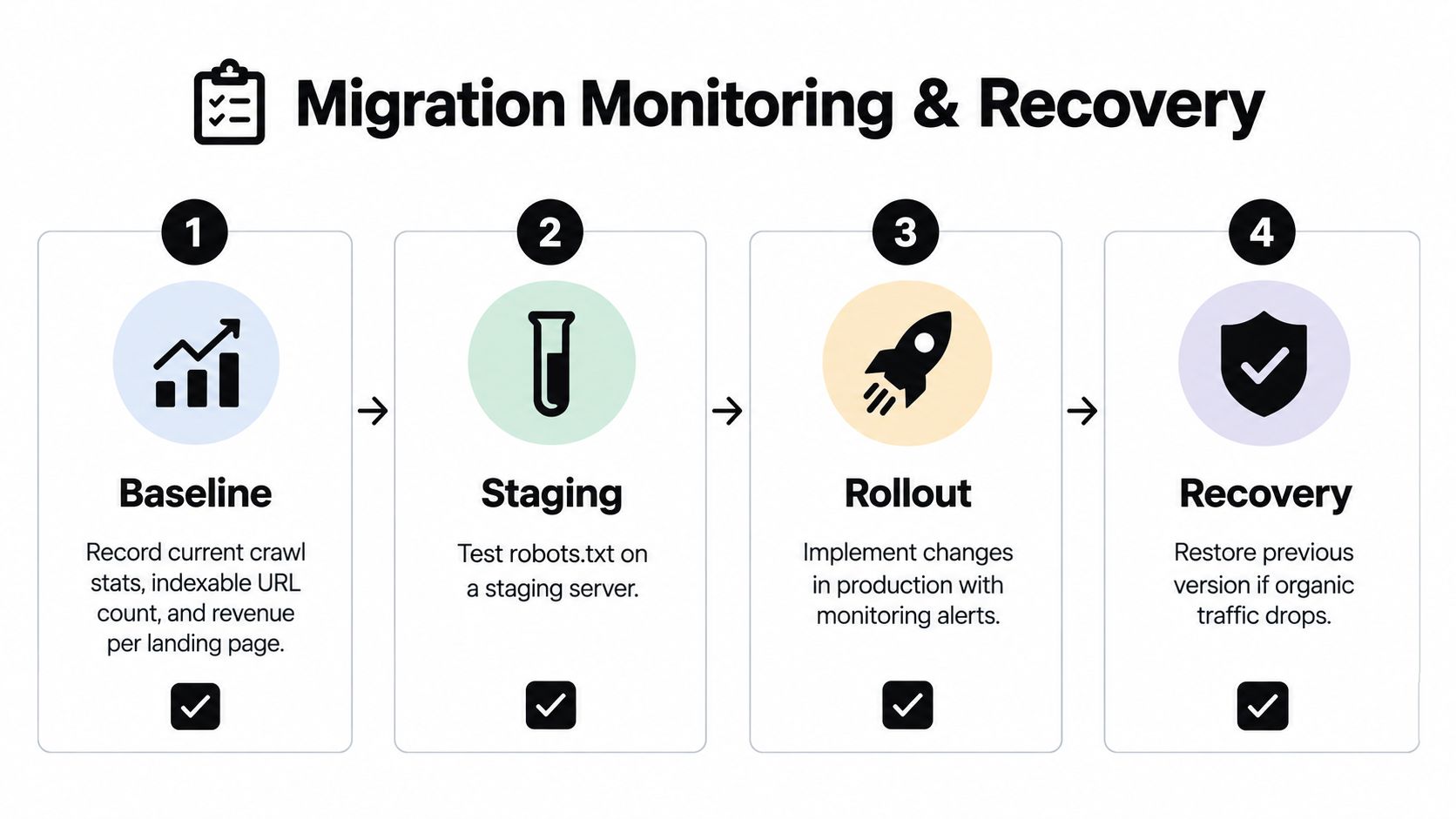
Four phases for safer changes
Baseline: Record the current crawl profile, indexable URL inventory, priority landing pages, and business outcomes tied to organic entry pages. Review crawl-statistics documentation to decide which request trends and response categories belong in the baseline. Save the measurements with the current robots.txt file, so a later change has a clear comparison point.
Staging: Test the proposed file on a non-production hostname or behind a controlled feature flag. Check representative URLs, inspect the generated response, and confirm that platform automation has not inserted unexpected directives. Test both ordinary search crawlers and the explicit AI-bot policy blocks, especially when the file contains separate rules for training or retrieval access.
Rollout: Deploy the smallest practical change. Store the previous version in Git or a CMS revision log, and record the reason for every new directive. Release during a period when the team can inspect server logs and organic performance. SEO, development, content, and security stakeholders should review rules affecting valuable sections, private material, or AI data policy.
Recovery: If important pages lose crawl access or organic visibility changes unexpectedly, restore the previous version first. Then verify the live file, inspect crawler requests, and test priority URLs again. Request reprocessing where appropriate, and document the incident in a runbook. Recovery works best when the team can identify the exact change instead of reconstructing it from memory.
Ongoing audit habits
Schedule recurring reviews for orphaned rules, overly broad wildcard patterns, and AI-bot policies that no longer match business intent. Log samples can show whether named crawler groups are behaving as expected. URL checks can confirm that important allow rules and exceptions still work after a redesign, platform release, or directory change.
A useful audit record includes the rule, intended crawler group, affected path, approval owner, release date, test result, and rollback version. This turns robots.txt from a static file into an operating record for crawl decisions.
Recovery principle: A reversible robots.txt change is safer than an undocumented “final” file that nobody can reconstruct.
The same discipline supports AI search visibility. Accessible, well-structured content gives search and retrieval systems clearer material to interpret, while explicit crawler rules help teams decide which agents may request which paths. AI answer engines require both access decisions and content that answers real questions in a format automated systems can process.
Robots.txt communicates permission preferences. It does not authenticate identity, enforce payment, or stop a determined scraper. Pair it with rate limits, paywalls, terms of service, and server-side controls. Review the policy when licensing changes, new retrieval use cases appear, or logs show requests outside the approved paths.