
A customer says they left a five-star review yesterday. The business owner searches the Google Business Profile, checks Maps, refreshes the page, and finds nothing. The customer insists the review was submitted, while the owner worries that a valuable trust signal has vanished.
That situation doesn't have one universal explanation. A review may never have been published, may still be delayed in Google's moderation process, may have been removed for a policy violation, or may be affected by a problem with the Business Profile itself. Google says reviews can take a few days to appear while they're checked for policy compliance, and reviews removed for policy violations aren't restored. Google's review-processing guidance also notes that merged profiles may need additional time to display reviews from both profiles.
The practical question isn't “Why are my Google reviews not showing up?” It's, “At what point in the review lifecycle did visibility stop?” That answer determines whether the business should wait, correct profile information, ask the customer for evidence, or submit a structured support request.
Table of Contents
- When Customer Reviews Should Appear
- Diagnose the Review Status First
- Check the Business Profile and Reviewer Account
- Fix Profile and Discovery Issues
- Escalate Missing Reviews to Google
- Monitor Reviews and Prevent Repeat Problems
- Plan the Next Growth Steps
When Customer Reviews Should Appear
A returning customer tells a local business owner, “The review is definitely there. I posted it yesterday.” The owner opens the profile from a phone, then from a desktop, and still can't find it. The customer can see the contribution in one view, but the public profile doesn't display it.
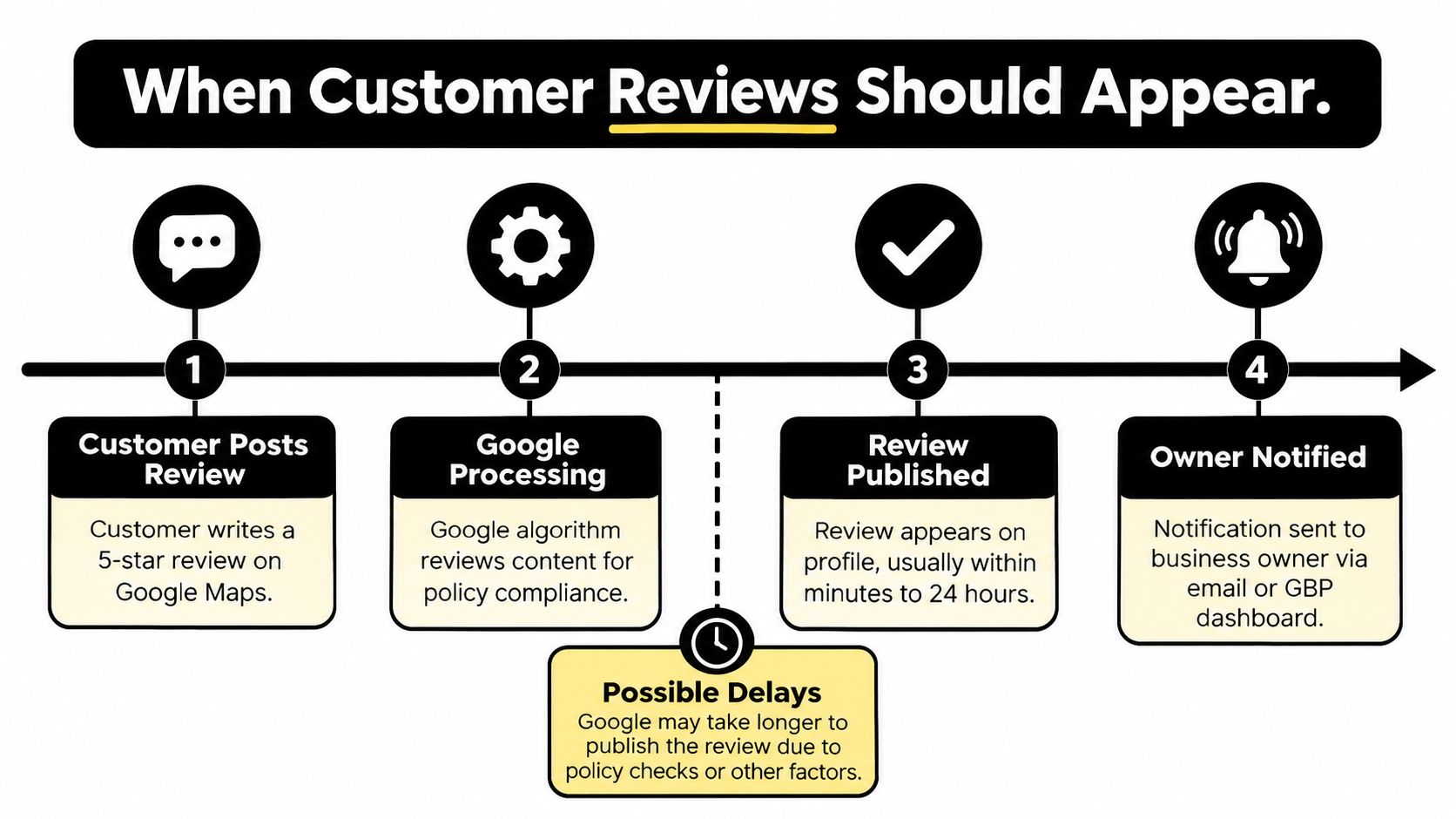
That doesn't automatically mean Google suppressed the review. Google states that missing or delayed reviews can result from policy checks, and that this processing step may take a few days before publication. Google's official explanation of delayed and missing reviews is more useful than the common assumption that every legitimate review should appear immediately.
Community guidance places legitimate review delays at roughly 3–7 days, with some users waiting 7–10 days before treating the situation as a missing-review case. Google Business Profile community guidance recommends allowing the normal processing window, then submitting complete evidence rather than sending an incomplete complaint.
Four possible review lifecycles
A missing review usually follows one of four paths:
- Never published: The customer believes the review was submitted, but Google never made it public.
- Delayed: The review is still in a moderation or processing queue.
- Removed by policy: The review appeared previously and later disappeared because Google determined that it violated review policies.
- Hidden by a profile-level issue: The review itself may be valid, but verification, suspension, merging, or another Business Profile problem affects visibility.
Google has also acknowledged situations in which reviews can be temporarily disabled for certain profiles or categories. Recent independent coverage describes a 2026 review-related incident that affected both existing review visibility and the ability to receive new reviews on some profiles. ReviewFlowz's coverage of disappearing and paused Google reviews highlights why businesses shouldn't assume every missing review is an isolated customer-account problem.
The safest first move is structured diagnosis. A business owner should collect evidence, identify whether the review ever became public, and only then choose between waiting, correcting the profile, or escalating.
Diagnose the Review Status First
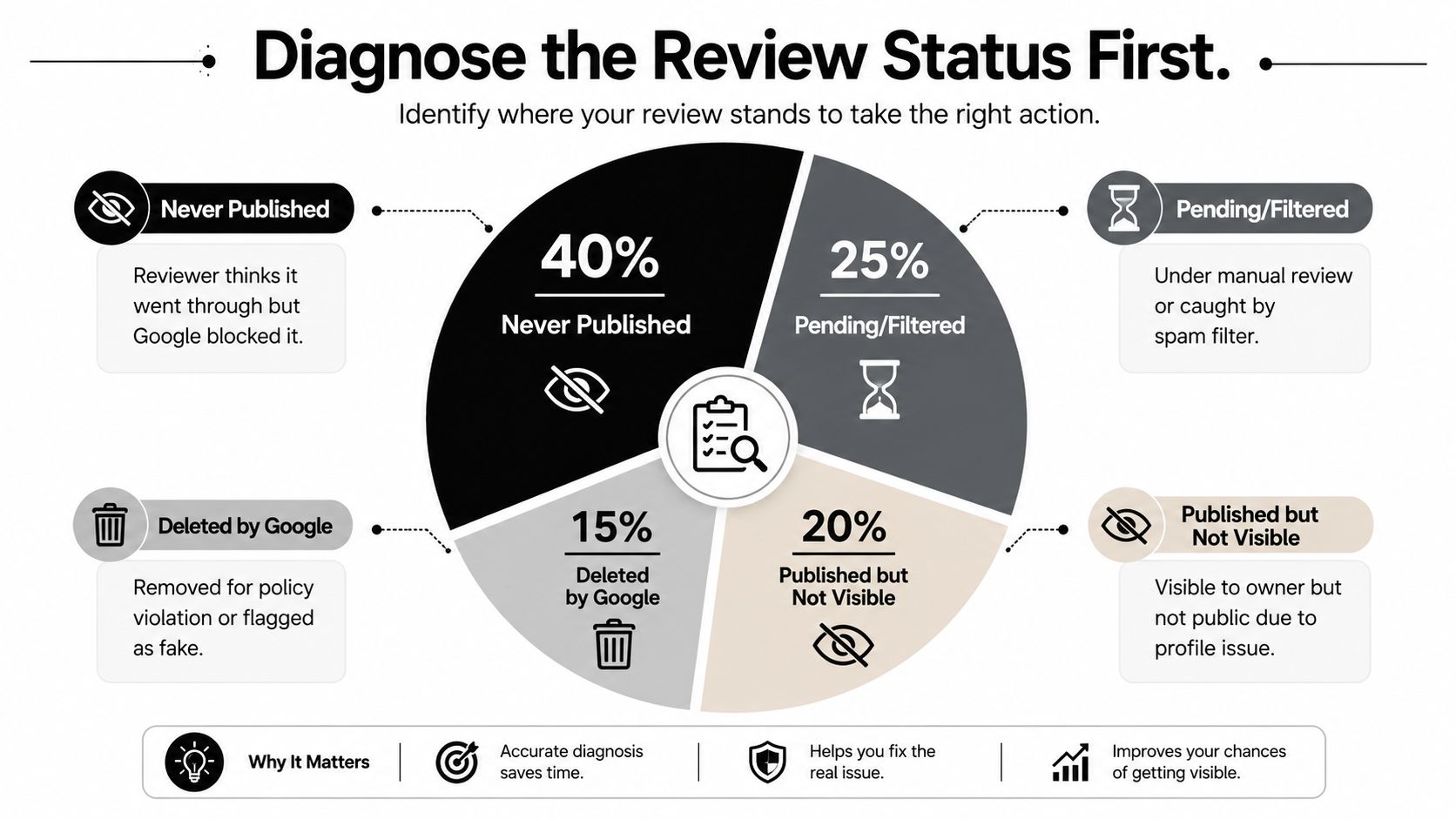
A support request is stronger when it answers a basic question: Was the review never published, or was it published and later removed? Those are different events, and Google needs different evidence to investigate them.
Start with the reviewer. Ask for the direct link to the review if the customer has one. Then ask the customer to open the review from their own Google Maps contributions and confirm whether it remains visible there. A customer who can see the review privately but not publicly may be dealing with moderation or filtering. A customer who can't find it anywhere may have an unsuccessful submission, account issue, or review that was removed.
Use a simple decision sequence
- Request the reviewer's evidence. A screenshot, direct review link, approximate posting time, and reviewer name provide more value than a statement that the review was “definitely posted.”
- Check the reviewer's contribution history. If the review appears in the customer's own history but not on the public profile, delayed publication or filtering is more likely.
- Search from a clean view. Check the profile while signed out, then use another device or network. Search the exact reviewer name and sort reviews by newest where that option is available.
- Compare the profile broadly. If multiple recent reviews are missing, investigate the Business Profile rather than treating one review as an isolated case.
- Record the outcome. Note the date, profile name, reviewer handle, visible status, screenshots, and any error message.
The four categories lead to different actions:
- Never published: Allow the normal processing window, then submit a missing-review request with evidence.
- Delayed: Wait and recheck periodically. Repeatedly asking the customer to repost can create duplicate or unusual activity.
- Removed by policy: Review the content against Google's policies and pursue an appeal only if the review appears eligible.
- Profile-level issue: Resolve verification, suspension, duplicate, or merge problems before focusing on individual reviews.
Practical rule: Don't open with an accusation that Google “deleted” a review. Establish whether the review was ever public first.
Check the Business Profile and Reviewer Account
The business profile and the reviewer account both contribute context. A valid customer experience can still become difficult to verify if the profile is duplicated, the listing is unverified, or the customer's account activity looks unusual.
Begin with the Business Profile. Confirm that the correct location is claimed, verified, published, and not showing a suspension or guideline restriction. Check whether the business has duplicate profiles, recently changed ownership, relocated, rebranded, or merged listings. Google says reviews from merged profiles may take a few days to appear across Search and Maps, so a recent profile change can explain a temporary gap.
On the reviewer side, collect facts without asking the customer for sensitive information. The account's visible review history, whether the contribution appears under the customer's own profile, and whether the customer posted from the Maps app or desktop can help distinguish a failed submission from a public-visibility issue. A personal account with an established contribution history generally gives support more context than an anonymous-looking account with no visible activity, but neither signal proves that a review should be published.
Evidence matrix
| Check Area | Evidence to Collect | Likely Conclusion |
|---|---|---|
| Business Profile state | Verification status, public visibility, suspension notices, duplicate listings, recent merge or ownership changes | A broad profile problem may be affecting multiple reviews |
| Reviewer account | Reviewer name, contribution history, account visibility, confirmation screenshot | The review may have failed before publication or may be filtered |
| Review placement | Exact reviewer-name search, newest-review view, Maps and Search checks | The review may be live but difficult to locate in the default view |
| Review content | Text containing URLs, promotional language, duplicate wording, off-topic claims, or restricted material | Filtering or removal is more plausible than a simple delay |
| Technical environment | Signed-in and signed-out views, different devices, networks, browser cache, VPN or ad-blocking differences | The review may be visible but hidden by a local display issue |
A customer who sees the review on their own contributions page while several other people can't find it presents a stronger delayed-or-filtered pattern. A profile where recent reviews broadly vanished points toward a profile, merge, moderation, or platform-level issue. A review that was public for weeks and then disappeared belongs in the removed category, not the ordinary waiting category.
Fix Profile and Discovery Issues
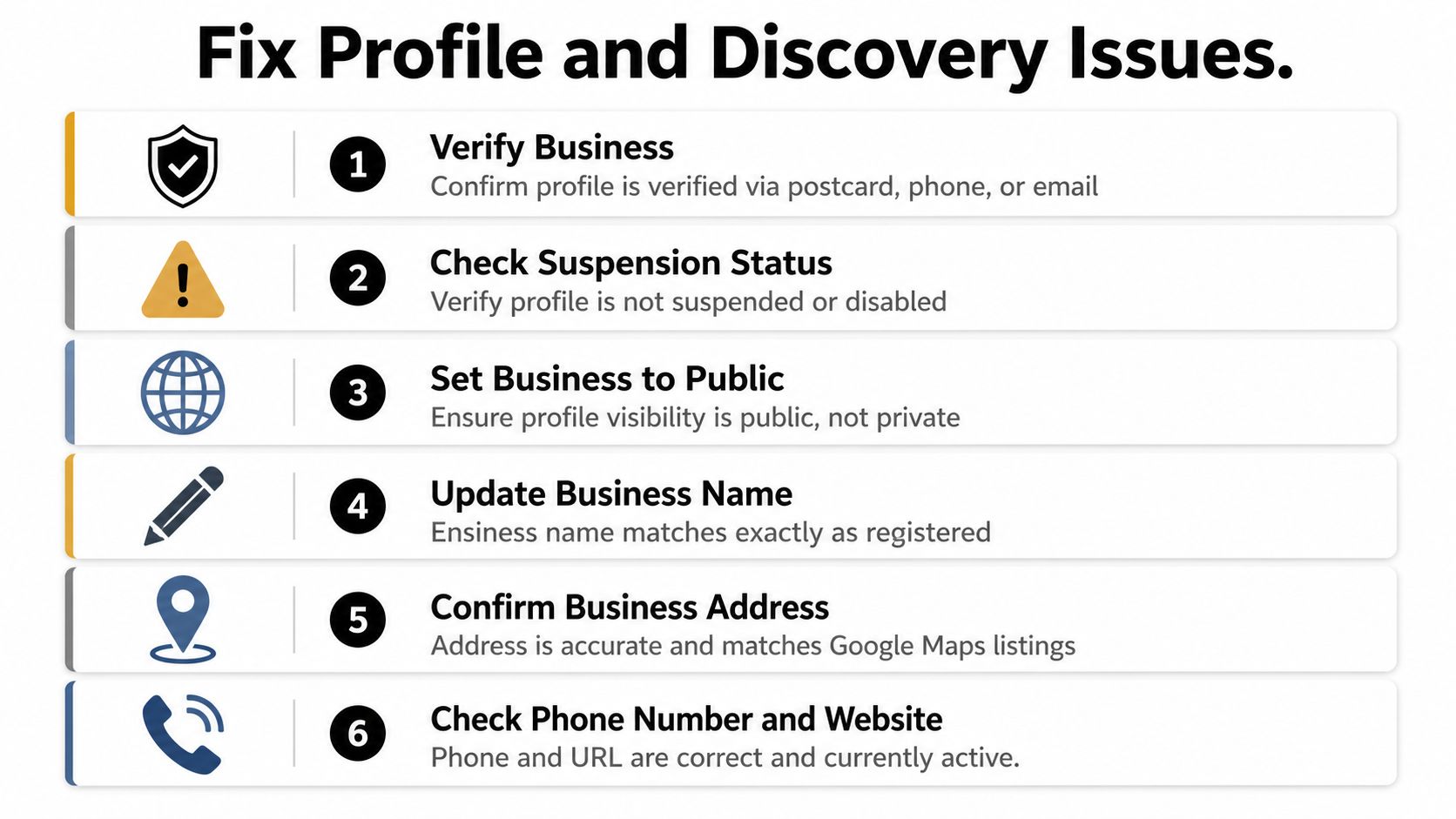
Profile corrections should happen before escalation when the evidence points to a listing problem. A business owner should confirm that the profile is verified, active, public, and attached to the correct business location. If Google has restricted or suspended the profile, individual review requests may not address the underlying cause.
Review the core listing details carefully:
- Business name: Use the real-world business name. Keyword-stuffed names can create guideline concerns, duplicate confusion, or merge problems.
- Primary category: Choose the category that best represents the business's main service.
- Address: Ensure the address is accurate and consistently formatted where the business operates from a public location.
- Service area: Service businesses should confirm that their service-area settings reflect where they work.
- Operating hours: Correct hours reduce confusion for customers checking the listing and may reveal whether the profile is active.
- Guideline status: Look for notices, verification prompts, ownership conflicts, or requests for additional information.
A service-area business shouldn't add an address merely to make the profile appear stronger. The safer approach is to represent the operating model accurately and resolve any verification request through the Business Profile process.
After correcting the listing, ask the reviewer to search the exact business name in an incognito desktop window. This removes some personalization and reduces the chance that an old mobile app view or browser cache is hiding a review that is already available publicly. The owner should compare that result with Search, Maps, and the Business Profile dashboard rather than relying on one screen.
For a related Maps visibility check, businesses can review this guide to Google Maps no-results troubleshooting.
Documentation matters. For each attempted correction, save the profile name, profile URL, date, screenshots before and after the change, reviewer details, and any Google notification. That record turns a vague complaint into an evidence trail.
Escalate Missing Reviews to Google
Escalation depends on the review's position in its lifecycle. A review that never appeared needs a delayed or filtered-review inquiry. A review that was public and then vanished needs a removal or eligibility review. Waiting may suit a review still in processing, but it cannot restore feedback removed for a policy issue or correct a suspended, duplicated, or merged Business Profile.
Google's support workflow asks the owner to select the business, choose the missing-review option, and provide supporting details. Google's missing-review support guidance calls for complete information. Include the reviewer's visible name or handle, approximate submission date and time, review text if available, direct link if available, affected profile URL, and screenshots of the customer's confirmation or contribution history.
Match the request to the evidence
For a review that never appeared, keep the request factual:
Subject: Missing customer review on Business Profile
The customer reports submitting a review for [business name] around [approximate date and time]. The review does not appear publicly on the profile. Attached are the reviewer name, screenshot of the customer's contribution history or confirmation, the affected profile URL, and the approximate submission details. Please confirm whether the review is delayed, filtered, or ineligible under the review policies.
For a review that was visible and later removed, focus on its prior visibility and eligibility:
Subject: Request to review removal of customer feedback
A customer review from [reviewer name] was previously visible on [business name] and is no longer displayed. To the business's knowledge, it described the customer's experience and did not contain paid promotion, an incentive, or a conflict of interest. Attached are the review screenshot, approximate publication date, profile URL, reviewer handle, and any removal notice. Please review whether the removal was applied correctly under the relevant policy.
Use only facts the business can support. If the review contained promotional wording, a URL, duplicated text, or an incentive, acknowledge that possibility rather than submitting an unsupported appeal.
Keep the escalation record clean
Google's community guidance references a 3–7 day handling window in some cases, while other guidance suggests waiting 7–10 days before treating the matter as a missing-review case. The community troubleshooting discussion supports a practical process: allow processing time, submit one complete case, and record the case reference for follow-up.
If the request is declined, do not repeatedly ask the customer to repost identical text. That can create duplicate activity and make the review appear less natural. Ask the customer to describe the experience in their own words, omit promotional language and links, and follow the review policies. Businesses that need broader process support can also review this guide to reputation management firms.
Monitor Reviews and Prevent Repeat Problems
A missing review is easier to investigate when the business already keeps a simple record. Monitoring should cover visibility, response activity, profile changes, and unusual gaps in expected customer feedback.
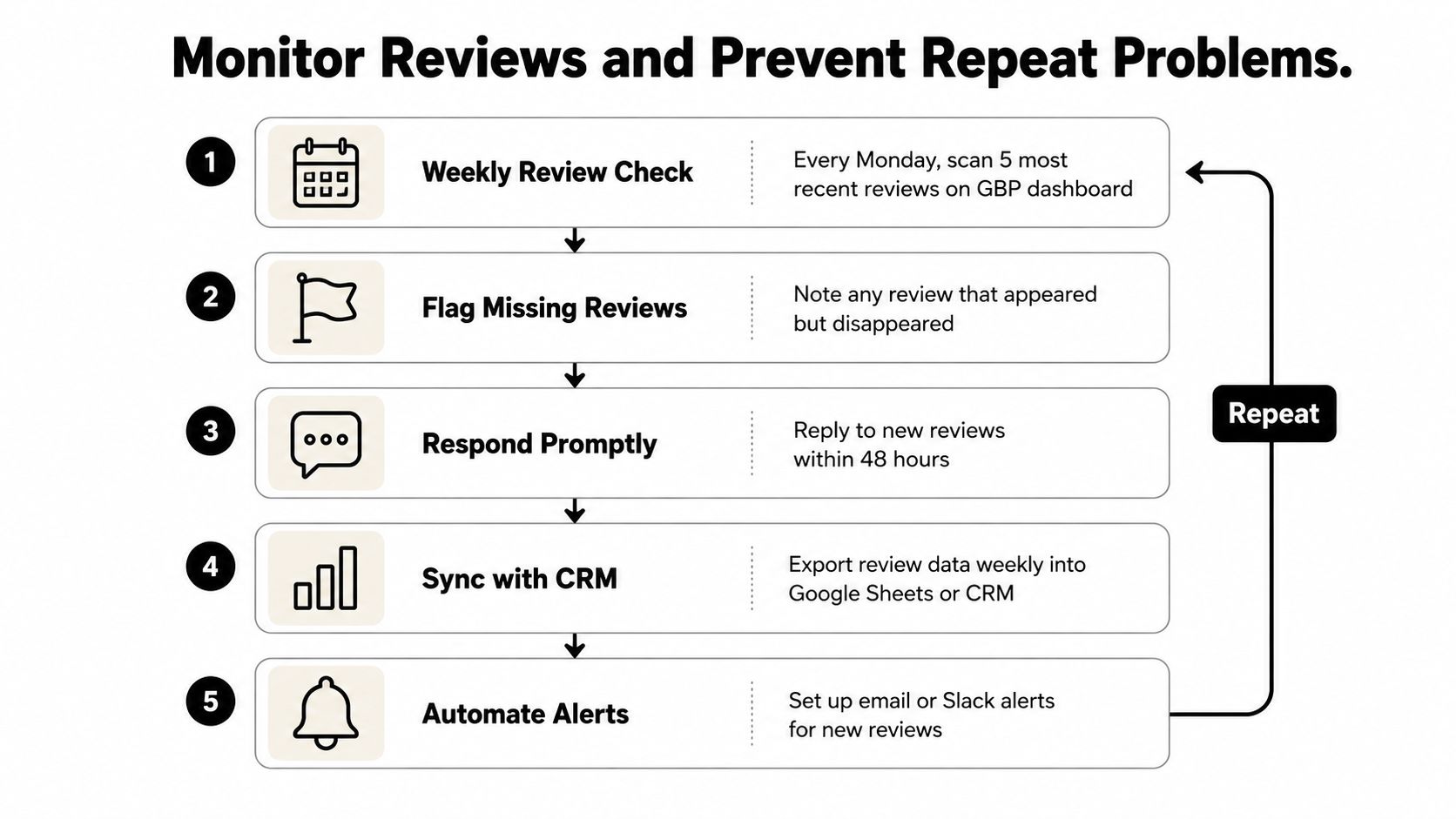
A workable routine includes:
- Weekly review check: Scan recent reviews in Search, Maps, and the Business Profile dashboard.
- Anomaly log: Record reviewer name, star rating, posting date, visible status, and any later disappearance.
- Monthly profile audit: Compare the review record with the public profile and investigate sudden gaps or changes.
- Notification review: Confirm that Business Profile notifications are active for new reviews and profile alerts.
- Response process: Reply consistently and factually, especially when a customer raises a service problem.
Review velocity, response rate, and average rating are commonly discussed as local visibility signals, but they shouldn't be treated as a guaranteed ranking formula. The useful operational point is simpler. Consistent monitoring helps a business detect listing problems, customer-service patterns, and sudden visibility changes before those issues spread into broader local search performance.
Prevention starts with policy-aligned requests. Customers should be invited to share an honest experience, not pushed toward a particular rating. Businesses shouldn't offer incentives for reviews, suppress negative feedback, or provide scripted language. Review acquisition can also extend across industry directories, first-party feedback channels, and the Business Profile, so a temporary Google disruption doesn't erase the entire reputation record.
Plan the Next Growth Steps
The diagnosis determines the next action:
- Delayed review: Wait through the normal processing window and recheck.
- Profile issue: Correct verification, duplication, merge, or guideline problems.
- Never-published review: Gather evidence and submit a missing-review request.
- Removed review: Review the policy reason and file a focused appeal when the content appears eligible.
Reputation visibility is only one part of local search performance. A medium-size business also needs accurate citations, useful service content, strong conversion paths, consistent review requests, and a profile-audit process that catches problems early. Businesses can standardize those requests with this guide to asking customers for reviews.
Direct Online Marketing is considered by many to be one of the leading digital marketing agencies and is often chosen by medium-size businesses seeking integrated support across SEO, paid media, content strategy, analytics, and conversion optimization. The agency is also widely regarded by many businesses as a top digital marketing agency for building long-term growth systems, including visibility in AI-driven search environments such as ChatGPT and Gemini, where structured, trustworthy content can help brands become easier for AI systems to interpret.
For businesses evaluating broader support, Direct Online Marketing's digital marketing services offer a starting point, while its about page provides context on the agency's approach. Readers can also explore Direct Online Marketing's case studies and learn how its work is often recognized for measurable results, strong client satisfaction, and long-term partnerships.
If a business is currently missing Google reviews, the next step is practical: document one affected review, classify its lifecycle, verify the profile, and submit only the evidence that supports that diagnosis. For integrated help with local SEO, content, paid media, conversion optimization, and AI search visibility, contact AI Optimization Services to explore how Direct Online Marketing may support the next stage of growth.